# View Shifts / Schedule

#### <span style="text-decoration: underline;">**Option 1: Using Laptop / Desktop**</span>

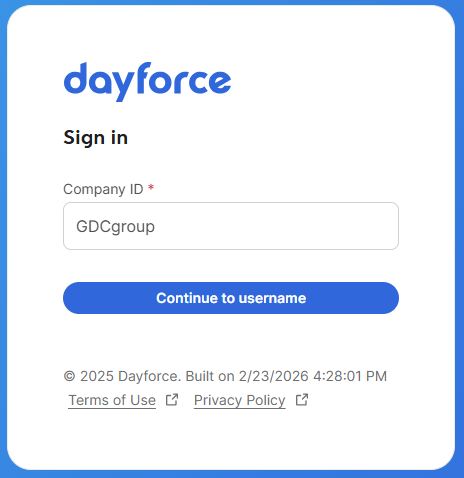
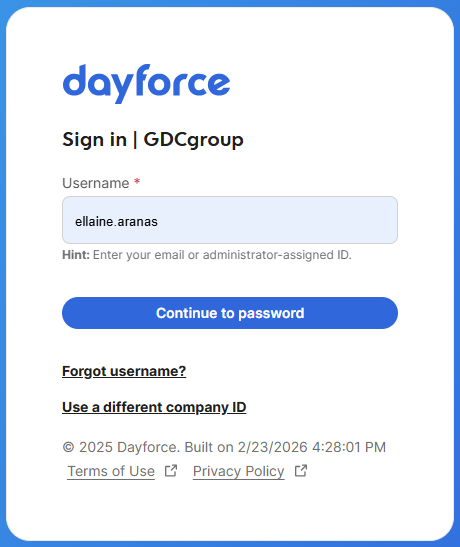
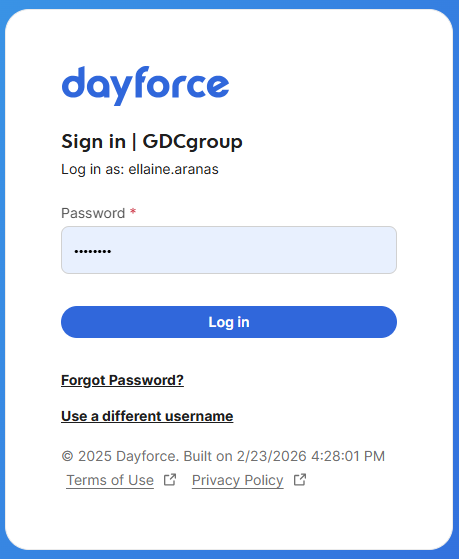
1\. Log in to Dayforce at **[MyDayForce Login](https://www.dayforcehcm.com/mydayforce/login.aspx "Dayforce Website")**

<table border="1" id="bkmrk-company-id%3A-gdcgroup" style="border-collapse: collapse; width: 100%; height: 306.05px;"><colgroup><col style="width: 33.3333%;"></col><col style="width: 33.3333%;"></col><col style="width: 33.3333%;"></col></colgroup><tbody><tr style="height: 306.05px;"><td style="height: 306.05px;">Company ID: GDCgroup

[![image.png](https://docs.goodwindcorp.com/uploads/images/gallery/2026-04/scaled-1680-/Prcimage.png)](https://docs.goodwindcorp.com/uploads/images/gallery/2026-04/Prcimage.png)

</td><td style="height: 306.05px;">Username: Firstname.Lastname

[![image.png](https://docs.goodwindcorp.com/uploads/images/gallery/2026-04/scaled-1680-/kXjimage.png)](https://docs.goodwindcorp.com/uploads/images/gallery/2026-04/kXjimage.png)

</td><td style="height: 306.05px;">Password:

[![image.png](https://docs.goodwindcorp.com/uploads/images/gallery/2026-04/scaled-1680-/BCRimage.png)](https://docs.goodwindcorp.com/uploads/images/gallery/2026-04/BCRimage.png)

</td></tr></tbody></table>

2\. Click the "calendar" icon.

[![image.png](https://docs.goodwindcorp.com/uploads/images/gallery/2026-04/scaled-1680-/mReimage.png)](https://docs.goodwindcorp.com/uploads/images/gallery/2026-04/mReimage.png)

3\. Calendar with the schedule will appear on the screen for the specified month.

[![image.png](https://docs.goodwindcorp.com/uploads/images/gallery/2026-04/scaled-1680-/9LKimage.png)](https://docs.goodwindcorp.com/uploads/images/gallery/2026-04/9LKimage.png)

a. To view by week, click the Calendar dropdown list and choose "week."

 [![image.png](https://docs.goodwindcorp.com/uploads/images/gallery/2026-04/scaled-1680-/2LCimage.png)](https://docs.goodwindcorp.com/uploads/images/gallery/2026-04/2LCimage.png)

b. Schedule for the specified week will appear on the screen.

[![image.png](https://docs.goodwindcorp.com/uploads/images/gallery/2026-04/scaled-1680-/Nfiimage.png)](https://docs.goodwindcorp.com/uploads/images/gallery/2026-04/Nfiimage.png)

c. To view by day. click the calendar dropdown list and choose "calendar day."

 [![image.png](https://docs.goodwindcorp.com/uploads/images/gallery/2026-04/scaled-1680-/2LCimage.png)](https://docs.goodwindcorp.com/uploads/images/gallery/2026-04/2LCimage.png)

d. Schedule for the specified day will appear on the screen.

[![image.png](https://docs.goodwindcorp.com/uploads/images/gallery/2026-04/scaled-1680-/FHTimage.png)](https://docs.goodwindcorp.com/uploads/images/gallery/2026-04/FHTimage.png)

#### <span style="text-decoration: underline;">**Option 2: Phone Device**</span>

1\. Download the Dayforce mobile application.

2\. Click the Dayforce mobile application and input the following:

<table border="1" class="align-center" id="bkmrk-company-id%3A-gdcgroup-1" style="border-collapse: collapse; width: 67.2619%; height: 333px;"><colgroup><col style="width: 50.0614%;"></col><col style="width: 50.0614%;"></col></colgroup><tbody><tr><td>Company ID: GDCgroup

[![Dayforce 3.png](https://docs.goodwindcorp.com/uploads/images/gallery/2026-04/scaled-1680-/dayforce-3.png)](https://docs.goodwindcorp.com/uploads/images/gallery/2026-04/dayforce-3.png)

</td><td>Username: firstname.lastname

Password: \*\*\*\*\*\*\*\*\*\*

[![Dayforce 1.png](https://docs.goodwindcorp.com/uploads/images/gallery/2026-04/scaled-1680-/dayforce-1.png)](https://docs.goodwindcorp.com/uploads/images/gallery/2026-04/dayforce-1.png)

</td></tr></tbody></table>

3\. Home page will appear on the screen.[![Dayforce4.png](https://docs.goodwindcorp.com/uploads/images/gallery/2026-04/scaled-1680-/dayforce4.png)](https://docs.goodwindcorp.com/uploads/images/gallery/2026-04/dayforce4.png)

4\. Click the "calendar" icon.

[![image.png](https://docs.goodwindcorp.com/uploads/images/gallery/2026-04/scaled-1680-/Jc3image.png)](https://docs.goodwindcorp.com/uploads/images/gallery/2026-04/Jc3image.png)

5\. Shift/Schedule per day will appear on the screen.

[![image.png](https://docs.goodwindcorp.com/uploads/images/gallery/2026-04/scaled-1680-/NdYimage.png)](https://docs.goodwindcorp.com/uploads/images/gallery/2026-04/NdYimage.png)